Maya prefers Mercury — better 1099 export
Got it. Noted as a banking preference for Maya.
Saved to mnueron
Episodic
Every conversation captured. Your AI saves what was said, when, by whom — searchable forever.
Session Continuity: auto-backup your Claude Desktop / Cowork sessions every 4 hours — “Resume from summary” without losing the thread.
How it works →Persistent memory for Claude Desktop, Claude Code, Cursor, Windsurf, Cline — and any app you build with OpenAI, Anthropic, Mistral, or anything else. Local-first and free forever. Optional hosted backend for cross-machine sync and team sharing.
Already have an account? Open Dashboard to sign in and start viewing your memories, savings, runbooks, and Meet intelligence.
npm install -g mnueron && mnueron setupFull install guide →Three ways to get started
Same memory store, three interfaces. Copy a snippet, run it once, your AI starts remembering.
One command to install, set up your local memory store, and point your AI tools at it.
"hl-c"># Step 1 — install mnueron globally
npm install -g mnueron

"hl-c"># Step 2 — interactive setup (writes ~/.mnueron/config.json)
mnueron setup

"hl-c"># Step 3 — save your first memory
mnueron save "Maya prefers Mercury over Stripe — better 1099 export"

"hl-c"># Step 4 — recall it later from any AI tool
mnueron recall "what does Maya think about banks"Six kinds of memory · one store
Most memory layers store flat chat logs. mnueron stores six layers, each tuned to a different question your AI will ask later.
Every conversation captured. Your AI saves what was said, when, by whom — searchable forever.
Facts extracted from chats. Standalone truths your agent can recall without re-reading the whole conversation.
Every mention of Maya, Maya P., and maya@stripe.com collapses into one canonical person.
Relationships between entities. 'Maya works at Stripe' is queryable like a graph, bi-temporal aware.
cd repogit add filesgit commit -m '...'git push origin mainProcedural memory. Save a how-to once, your AI agents pull it back when they hear a matching trigger.
Maya prefers Mercury
Maya likes Mercury better
Duplicates auto-detected. LLM merges them on approval, preserving every distinct fact.
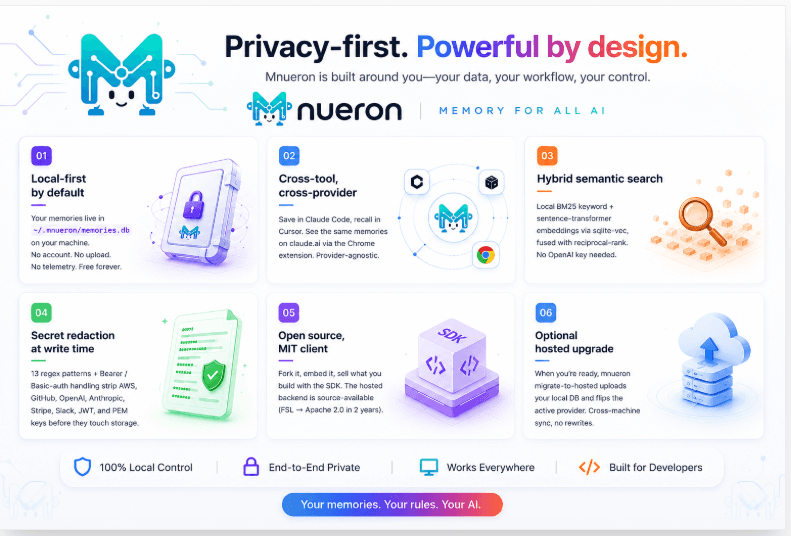
Mnueron is built around you — your data, your workflow, your control.
Your memories live in ~/.mnueron/memories.db on your machine. No account, no upload, no telemetry. Free forever.
Save in Claude Code, recall in Cursor. See the same memories on claude.ai via the Chrome extension. Provider-agnostic.
Local BM25 keyword + sentence-transformer embeddings via sqlite-vec, fused with reciprocal-rank. No OpenAI key needed.
13 regex patterns + Bearer / Basic-auth handling strip AWS, GitHub, OpenAI, Anthropic, Stripe, Slack, JWT, and PEM keys before they touch storage.
Fork it, embed it, sell what you build with the SDK. The hosted backend is source-available (FSL → Apache 2.0 in 2 years).
When you're ready, mnueron migrate-to-hosted uploads your local DB and flips the active provider. Cross-machine sync, no rewrites.
Run mnueron setup once. The wizard detects every installed AI tool and wires mnueron into each. Restart your tools and your AI remembers.
Claude Desktop
MCP auto-config
Claude Code
MCP via claude mcp add
Cursor
~/.cursor/mcp.json
Windsurf
~/.codeium/windsurf
Cline
VS Code extension
claude.ai
Chrome extension
chatgpt.com
Chrome extension
Your apps
Python + C# SDK
The mnueron Chrome extension turns the AI chat sites you already use into first-class mnueron sources. Save what matters, pull in your past conversations, and have the AI quietly know your context as you type.
One click from the Chrome Web Store. Source on GitHub — Edge and Firefox builds available there.
Backend
On Claude
Recall
mnueron · memory for every AI
Export any subset of your memories — by namespace, by conversation, or all of it — to Markdown, HTML, JSON, NDJSON, or CSV. Drop the file into Claude, Cursor, Cline, ChatGPT, a spreadsheet, or your own pipeline. Your memory belongs to you, in whatever format helps you reuse it.
Format
Group by
Namespace
127 memories · grouped into 14 conversations
npm install -g mnueron && mnueron setup. The wizard configures Claude Code, Cursor, Cline, and any other MCP-aware tool you have.
Memory tools appear automatically. Save facts, decisions, project conventions. Memories accumulate at ~/.mnueron/memories.db.
Want cross-machine sync or team sharing? mnueron migrate-to-hosted uploads your local DB and flips the active provider. One flag.
Drop the Python or C# SDK into any app. The same pattern works with OpenAI, Anthropic, Mistral, Gemini, or anything else — mnueron doesn't know or care which LLM you're using.
from mnueron import Mnueron
from openai import OpenAI

mem = Mnueron(api_key="mnu_...")
llm = OpenAI()

# Pull memory before the LLM call — provider-agnostic
context = mem.search(user_message, namespace=f"user-{uid}", k=5)
ctx_str = "\n".join(m.content for m in context)

resp = llm.chat.completions.create(
    model="gpt-4o-mini",
    messages=[
        {"role": "system",
         "content": f"What you know about this user:\n{ctx_str}"},
        {"role": "user", "content": user_message},
    ],
)

# Save anything worth remembering
mem.save(extract_facts(resp), namespace=f"user-{uid}")On the left: what mnueron looks like across every AI tool you use. On the right: the save → recall → inject loop in action, looping every 12 seconds.
side-projectClaude recalled your past decision without you re-explaining anything.
Every chat tool you've ever owned gets worse the longer you use it — history bloats, duplicates pile up, stale notes drown the good ones. Mnueron is the opposite. A nightly reflective pass reads your store, merges duplicates, retires superseded statuses, and writes a log of what changed. Recall stays sharp as your data grows.
mnueron consolidate manually. Paid users get it scheduled across every machine, with sync running on the same cycle.Nightly run · 2026-05-25
namespaces touched .. 4
entries deleted ..... 22
exact-dup pairs ..... 2
time-fixes .......... 0
saved as ............ mnueron:7ba69936
patterns surfaced:
- elevizio ns ~80% redundant
chunks across 6 sessions
- default ns full of dev
test entries (14 deleted)
- scheduled-task prompts
becoming memoriesMost memory engines were built for cloud-only agent runtimes. mnueron meets developers where they already work — Claude Code, Cursor, Cline, Windsurf — and keeps your bytes on your machine by default.
| Feature | mnueron | Mem0 | Letta | Zep | OpenAI Memory |
|---|---|---|---|---|---|
| Local-first / offline mode | Yes | Partial | Partial | No | No |
| Open source | MIT | Apache | Apache | Apache (core) | No |
| MCP-native IDE integration | 10 IDEs | No | No | No | No |
| Session continuity (auto-resume) | Yes | No | Partial | No | No |
| Web chat capture (Claude/ChatGPT) | Yes | No | No | No | ChatGPT only |
| Hybrid search (FTS + vector) | Yes | Yes | Yes | Yes | Yes |
| Auto-synopsis on save | Yes | No | Partial | No | Partial |
| Fact extraction | Yes | Yes | Partial | Yes | No |
| Entity resolution (cross-session) | Yes | Yes | Yes | Yes | No |
| Knowledge graph | Yes | Yes | Partial | Yes | No |
| Procedural memory (runbooks) | Yes | No | No | No | No |
| Self-revising memory (LLM merge) | Yes | No | Yes | No | Partial |
| Temporal reasoning (bi-temporal) | Yes | Partial | Partial | Yes | No |
| Webhooks (HMAC-signed) | Yes | No | No | Partial | No |
| Secret redaction on write | Yes | No | No | No | No |
| BYOK (your own AI key) | Yes | No | No | No | No |
| Free unlimited tier | Local | Partial | Self-host | Partial | Capped |
Where competitors lead today and where we're heading.
Comparison reflects publicly documented capabilities of each project as of May 2026. We may have missed nuance — open an issue on GitHub and we'll update.
Local mode is unlimited and free. Pick the paid tier that matches how much you sync.
Full local mode: MCP server, dashboard, Chrome extension, SDKs. No account.
Persistent memory for individual developers. Cross-machine sync + AI extraction.
Advanced memory and productivity tools for power users and creators.
Shared workspaces, role-based access, audit log. Built for teams that build together.
Enterprise (SSO, BAA, on-prem) — contact us.

Install in one command. No credit card. Open source.